
Faster APIs, faster developers: API Gateway custom authorizers
A synthetic API test explores whether a shared remote cache can reduce the latency added by an API Gateway custom authorizer.
 Ellery Addington-White
An API Gateway custom authorizer makes authorization logic reusable, but it also adds another function—and, in this demo, another data lookup—to each request. I wanted to see whether a shared remote cache could reduce that cost without moving the authorization decision back into every service function.
This experiment extends the REST API from my previous Lambda latency test. The original service used AWS Lambda, Amazon API Gateway, and DynamoDB to model user profiles for a small social network. Here, we add profile-picture endpoints, protect them with a follower check, and compare uncached and cached request paths.
This is a synthetic demo, not a production authentication design or a comprehensive benchmark.
Historical implementation: The linked serverless API demo repository preserves the 2022 application and benchmark setup. Its deployment instructions are not expected to work unchanged today. They use the old
momento account signup awsflow and a region-bound token placeholder hard-coded in the source; the SDK and setup also predate current API keys, regional endpoints, and v2 credential providers. Treat the repository as source material for this experiment, not as a current deployment guide.
How the request is authorized
An API Gateway custom authorizer is a Lambda function that runs before the service Lambda or proxied AWS resource. It examines the incoming request, performs the application’s authentication and authorization checks, and returns an IAM policy that allows or denies the request.
Centralizing that logic gives service teams one reusable authorization path instead of separate implementations across multiple endpoints. It can make the safer path the easier path, but it also puts the authorizer’s work directly in the request path. Alex DeBrie’s guide to Lambda custom authorizers covers the pattern and its tradeoffs in more depth.
Extend the demo API
First, we add an optional profile_pic property to the user model:
interface User {
   id: string,
   name: string,
   followers: Array<string>,
   profile_pic?: string
}
The /bootstrap endpoint fetches a random profile picture and stores it in DynamoDB as a base64-encoded string alongside the rest of the user data. The existing /users/:id and /cached-users/:id routes still return only id, name, and followers to keep their responses lightweight.
Two new routes return only the requested profile picture:
/profile-pic/:idreads user data directly from DynamoDB./cached-profile-pic/:iduses the look-aside cache before falling back to DynamoDB.
Implement the follower check
The custom authorizer allows a profile-picture request only when the requesting user appears in the profile owner’s followers list. The relevant excerpt follows:
import {AuthorizerRequest} from "../models/authorizer";
import {DefaultClient} from "../repository/users/users";
import {UsersDdb} from "../repository/users/data-clients/ddb";
import {getMetricLogger} from "../monitoring/metrics/metricRecorder";

const ALLOW = 'Allow', DENY = 'Deny';
const ur = new DefaultClient(new UsersDdb());

export const handler = async (event: AuthorizerRequest): Promise => {
   const methodArn = event.methodArn;
   try {
       return await customAuthLogic(event.headers['Authorization'], methodArn, event.pathParameters['id'])
   } catch (error) {
       console.error(`fatal error occurred in authorizer err=${JSON.stringify(error)}`);
       throw new Error('Server Error'); // 500.
   }
}

const customAuthLogic = async (authToken: string, methodArn: string, requestedUserId: string): Promise => {
   const startTime = Date.now()

   // In a real API, validate authToken first (AuthN) to obtain a verified user ID.
   // This demo blindly trusts the supplied ID value.
   //
   //   ex:       Authorization: 1

   // Perform app AuthZ: check whether the requesting user follows the profile-picture
   // owner identified by the API resource path parameter.

   let user: undefined | User;
   if (process.env["CACHE_ENABLED"] === 'true') {
       user = await ur.getCachedUser(requestedUserId);
   } else {
       user = await ur.getUser(requestedUserId);
   }
   if (!user) {
       throw new Error(`no user found requestedUserId=${requestedUserId}`);
   }

   if (user.followers.indexOf(authToken) < 0) {
       console.info(`non follower tried to access a profile pic requestedResourceUserId=${user.id} requestingUser=${authToken}`);
       return generateAuthorizerRsp(authToken, DENY, methodArn, {})
   }
   console.info(`successfully authenticated resource request requestedResourceUserId=${user.id} requestingUser=${authToken}`);
   getMetricLogger().record([{
       value: Date.now() - startTime,
       labels: [{k: "CacheEnabled", v: `${process.env["CACHE_ENABLED"]}`}],
       name: "authTime"
   }]);
   getMetricLogger().flush();
   return generateAuthorizerRsp(authToken, ALLOW, methodArn, {id: authToken})
}

const generateAuthorizerRsp = (principalId: string, Effect: string, Resource: string, context: any) => ({
   principalId,
   policyDocument: {
       Version: '2012-10-17',
       Statement: [{Action: 'execute-api:Invoke', Effect, Resource}],
   },
   context,
});
The CACHE_ENABLED environment variable chooses between the direct DynamoDB lookup and the look-aside cache.
The Authorization header in this demo is only a user ID, and the code trusts it without validation. It demonstrates the authorization and caching path, not real authentication. A production system must verify the caller’s token or identity before using it in an authorization decision.
Wire both paths in CDK
We deploy separate authorizer functions for the cached and uncached paths, then attach each one to its corresponding API route:
// Lambda for custom authorizer with cache
const customAuthLambdaWithCache = new NodejsFunction(this, 'CustomAuthFunctionWithCache', {
   entry: join(__dirname, '../../src/functions', 'isFollowerAuthorizer.ts'),
   ...nodeJsFunctionProps,
   environment: {
       "RUNTIME": "AWS",
       "CACHE_ENABLED": "true"
   }
});
// Lambda for custom authorizer with no cache
const customAuthLambdaNoCache = new NodejsFunction(this, 'CustomAuthFunctionNoCache', {
   entry: join(__dirname, '../../src/functions', 'isFollowerAuthorizer.ts'),
   ...nodeJsFunctionProps,
   environment: {
       "RUNTIME": "AWS",
       "CACHE_ENABLED": "false"
   }
});

// Read perms for lambdas
dynamoTable.grantReadData(customAuthLambdaWithCache);
dynamoTable.grantReadData(customAuthLambdaNoCache);

// Add profile-picture API with custom authorizer that does not use caching
api.root.addResource('profile-pic').addResource('{id}',
   {
       defaultMethodOptions: {
           authorizationType: AuthorizationType.CUSTOM,
           authorizer: new RequestAuthorizer(this, 'IsFollowerAuthorizerNoCache', {
               authorizerName: 'authenticated-and-friends-no-cache',
               handler: customAuthLambdaNoCache,
               // Don't cache at GW level we want follower updates enforced
               // as quickly as possible for this demo
               resultsCacheTtl: Duration.seconds(0),
               identitySources: [
                   IdentitySource.header("Authorization"),
               ]
           })
       },
   }
).addMethod("GET", svcLambdaIntegration);
// Add cached profile-picture API with custom authorizer that uses caching
api.root.addResource('cached-profile-pic').addResource('{id}',
   {
       defaultMethodOptions: {
           authorizationType: AuthorizationType.CUSTOM,
           authorizer: new RequestAuthorizer(this, 'IsFollowerAuthorizerWithCache', {
               authorizerName: 'authenticated-and-friends-with-cache',
               handler: customAuthLambdaWithCache,
               // Don't cache at GW level we want follower updates enforced as quickly as possible for this demo
               resultsCacheTtl: Duration.seconds(0),
               identitySources: [
                   IdentitySource.header("Authorization"),
               ]
           })
       },
   }
).addMethod("GET", svcLambdaIntegration);
Both authorizers set resultsCacheTtl to 0. That disables API Gateway’s authorizer-result cache so follower changes can take effect quickly in this demo. The cached path still uses the application’s remote look-aside cache for its user lookup.
Check the allow and deny paths
Set API_URL to the base URL for your deployed stage. Then retrieve user 0. The bootstrap step generates followers randomly, so your IDs will differ:
curl "$API_URL/users/0" -s | jq .{
"id": "0",
"followers": [
"95",
"77",
"22",
"65",
"39"
],
"name": "Relaxed Elephant"
}For this generated user, follower 22 receives a successful response:
curl -s -o /dev/null -w "\nStatus: %{http_code}\n" \
  -H "Authorization: 22" \
  "$API_URL/profile-pic/0"
Status: 200The response body contains the base64-encoded profile picture. The command discards it because this check only needs the status code.
User 44 is not in the same follower list, so API Gateway denies the request:
curl -s -o /dev/null -w "\nStatus: %{http_code}\n" \
  -H "Authorization: 44" \
  "$API_URL/profile-pic/0"
Status: 403Compare cached and uncached latency
The simple test sends 100 sequential requests to each endpoint and repeats those loops a few times. It records custom metrics in CloudWatch for the authorizer, service endpoint, and backing data lookup.
Run the uncached path:
for i in $(seq 1 100); do
  curl -o /dev/null -H "Authorization: 22" "$API_URL/profile-pic/0" -s
done
Then run the cached path:
for i in $(seq 1 100); do
  curl -o /dev/null -H "Authorization: 22" "$API_URL/cached-profile-pic/0" -s
done
This test is intentionally small: it uses sequential requests from one client and does not document enough conditions to support a general performance comparison. It answers a narrower question about whether the cache helped this demo’s request path.
What the test showed
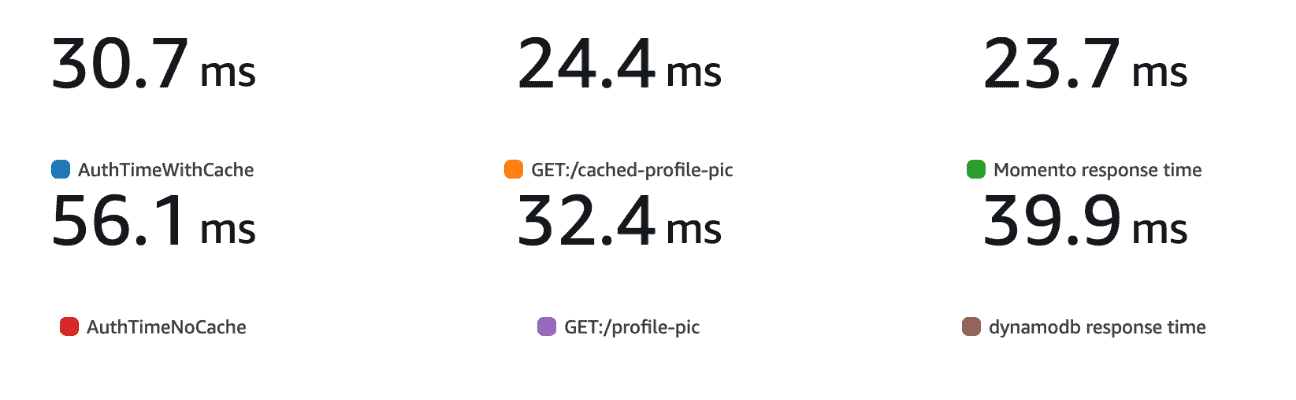
The CloudWatch metrics showed lower average response times with the remote cache enabled. The retained p99 chart showed the same direction: authorizer time was 30.7 ms with caching and 56.1 ms without it; the cached and uncached endpoint metrics were 24.4 ms and 32.4 ms; and the Momento and DynamoDB lookup metrics were 23.7 ms and 39.9 ms.
What to carry forward
Separating authorization from service code gives teams one place to apply and review an access policy. It also adds work to the request path. In this experiment, sharing a remote cache between the authorizer and service reduced that lookup cost while preserving the reusable authorization boundary.
The practical lesson is not that every authorizer needs a cache. Measure the complete request path, decide how fresh each authorization input must be, and cache only where that tradeoff fits the application.
Explore the 2022 serverless API demo repository to inspect the historical application and benchmark setup. If you adapt it, start with the current Momento authentication guidance instead of following the old deployment steps unchanged.